 Ownhand
Handwriting to font · iPhone and iPad
Your handwriting, as a real font.
Write each letter once, one per box, with a finger or an Apple Pencil. Ownhand turns them into a TrueType file you can install and then use in Notes, Pages, GoodNotes, Canva and Word. About five minutes, no printer, no scanner, nothing uploaded.
In development. Not in the App Store yet.
How it works
One letter per box, and about five minutes.
Nothing to trace, nothing to print. You write each letter the way you write it, in its own box on ruled guides, and the engine does the rest on the device.
-
Write one letter per box
Lowercase, capitals, numbers, punctuation and accent marks, then lowercase once more. Finger or Apple Pencil, on ruled guides.
-
The engine builds a font
It takes each box as a letter, traces the strokes into TrueType outlines, spaces them optically, measures kerning and composes the accents.
-
Preview the real file
Not a mock-up. Every slider change rebuilds the actual font in about a fifth of a second and renders it with CoreText.
-
Install it
Through an iOS configuration profile, or share the TTF to a Mac, a PC, Canva or Cricut and use it there.
Written, not stamped
The same letter, never twice the same.
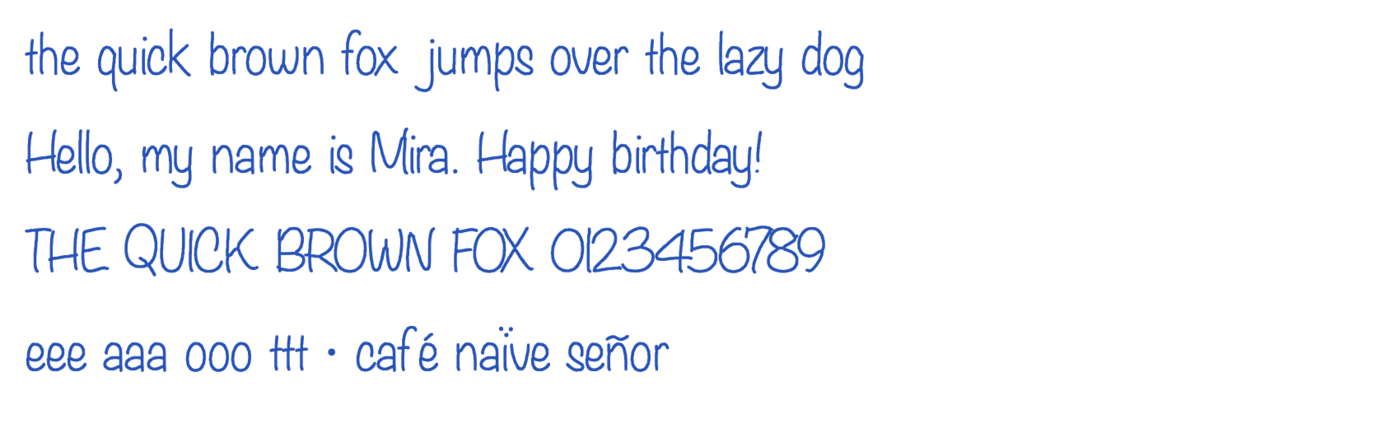
A font made of one drawing per letter reads as a stamp: every e on the page is identical, and the eye notices. Ownhand keeps every version you wrote.
- You write lowercase twice, and the two versions alternate as you type.
- Spacing is measured from your own strokes rather than assumed.
- Kerning pairs are measured, so awkward gaps close up.
- Accents are composed, so café and naïve come out right.
- A Neat–Natural dial keeps the wobble or tidies it up.

Where your handwriting goes
Nowhere.
Capture and build never touch the network. Your handwriting is on your phone, the font is built on your phone, and it leaves only if you export it yourself.
- No account, no upload, no server round trip to make a font.
- No analytics in this version, no ads, no tracking.
- Installing goes from the app to Settings inside your device. The privacy page has the detail.
Pricing
Free.
Everything runs on your device, so there is nothing to charge you for. Make as many fonts as you like, install them and share them. No ads, no account, no subscription.
Questions